Posts

XrmToolBox : Use the Nuget package to develop your own plugins

Image
It has been an old request, it is now available! I just published a nuget package that includes the latest version of XrmToolBox executable and the connection libraries. When you want to develop your own plugin, you can use the Visual Studio Template available in the XrmToolBox donwload page. But there is still missing references. To resolve this problem, I published a nuget package that will import these missing reference to your Visual Studio project. To install the package in Visual Studio, right click on the references folder and “Manage nuget packages”. Then search for “XrmToolBox”, you will find the package. Install it!
New XrmToolBox plugin : Form Parameter Manager

Image
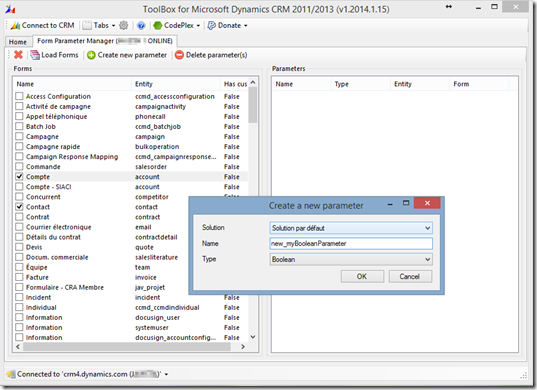
Today, I’m releasing a new plugin for my XrmToolBox application! This plugin has been asked by one of my fellow MVP, Dave Berry. This plugin helps you to create and delete form parameters in bulk. Without this tool, you should open each form properties panel to create the parameter required. The same operation apply when you need to delete them. So, again, it’s a productivity tool. Here is what it looks like: You can load all forms. They are listed with a boolean that indicates if custom parameters already exist for selected forms. You can create parameters in bulk. The panel on the right side list parameters included in selected forms from the panel on the left side. As usual, the XrmToolBox with all its plugins (currently 17!) can be downloaded from CodePlex If this plugin (and the other ones) improve your productivity, you should consider rating the tool on CodePlex or making a small donation

Happy birthday XrmToolBox!!

Image
Today, we celebrate XrmToolBox first anniversary!  this seems like a good time to give some figures XrmToolBox was born in December 19th of 2012 It has been downloaded more than 12.000 times It has been reviewed 9 times It has been rated 19 times with mainly 5 stars It is made of 17 tools: 15 from MscrmTools 1 tool from DamSim 1 tool from  ProCentrix 1 tool from D La B and perhaps others I do not know Below is the result of the poll I started in a previous post. As you can see, SiteMap Editor, View Layout Replicator and Web Resources Manager are the most used tools. But do not hesitate to try out the other tools : they could certainly help you. What is coming next? I have still some tools to develop and the toolbox will still be updated to be always better. You can help me by making a donation as this encourages me to continue improving the toolbox and provide new tools. For those of you that donate something, I give you a specific file to put on your XrmToo...

Introducing new tool: Sync Filter Manager

Image
This tool was requested by my fellow MVP’s Scott Sewell and Joel Lindstrom from Customer Effective. All credit goes to them for the quality of this tool as they tested it, provided great feedback to have the best tool possible. Having said that, what does the tool do? It allows you to manage filters applied to synchronize contact and activity data with CRM for Outlook or Server sync (Outlook filters) or data synchronized offline by CRM for Outlook(offline filters). Traditionally these filters are managed by users. This tool allows an administrator to globally manage user filters. Here is what the tool looks like With this tool, you can: List and delete System Synchronization filter: These filters applies to all users and users can’t change them. List, delete, define as default and apply Synchronization Filters Templates to users: These filters applies to users you choose and users can delete these filters if they want to. (Note: Although there can be multiple filters per e...

Poll : XrmToolBox usage

Hi everybody, Could you answer this quick poll? I'm trying to understand what tools are most used in the XrmToolBox (even if I have a little idea). Thank you! What are the tools you use most? Access Checker Attribute Bulk Updater Audit Center FetchXml Tester Iconator Metadata Document Generator Privileges Discovery Role Updater Script Finder SiteMap Editor Solution Import Easy Translator View Layout Replicator Web Resources Manager Solution Transfer Tool    pollcode.com free polls  

An easy way to find the ID of a record : What is my id?

Image
Hi, When I develop features for Microsoft Dynamics CRM, I often need to find the id of the record on which I am working. Generally, I press the F11 key and I get the ID in the midst of all the other information contained in the URL. Now, I use a solution that I created that displays on all forms a button to display the ID of the current record. Here is an overview It’s really a small solution which does almost nothing but it’s more than playing with F11 key. Click here to download the managed solution

CrmTraceReader updated!

Image
I just updated the Trace Reader to ease loading files and searching You can now drag and drop file(s) directly on the reader (in fact, the drag and drop works only on the list of trace items but that is cool anyway ) You can also clear all filters to get back to all trace items and when you reload file(s), the filters are kept if relevant. As usual –> CodePlex