Hi Tanguy, because I'm really pleased by your tools and I wanted to give my colleagues a short overview of your tools, I posted a blog article regarding your tools. You can have here.
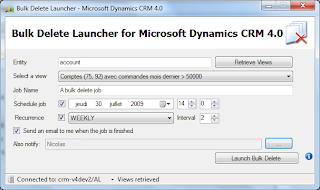
Today, a new tool that allows you to run bulk deletion of records. Indeed, this feature of CRM is not accessible through the user interface but only with SDK. To use this tool, you must first create a view in the advanced search that will find the items you want to delete. Then just run the tool, to indicate on which entity (using the logical name of the entity) is the view advanced search and set scheduling options and recurrence (if desired). You can also request to receive an email from the CRM server when processing is complete. This option is available if the user account you use has an email address saved in the user profile CRM. Screenshot: Download:
UPDATE: A new version is available on CodePlex Hello CRM community! Two months ago, Philippe Brissaud from Microsoft Canada asked me to help him migrate the well known CrmDiagTool 4 to Microsoft Dynamics CRM 2011. I guess you know what I answered him: of course I help! Today, Philippe and I are proud to release this new version of CrmDiagTool. We focused on Server diagnostics and removed features related to reporting services and email router. The features are the following: Enable/Disable tracing Zip content of Trace directory Open Trace directory Generate diagnostic file in text or html format with components selection Enable/Disable DevErrors Some screenshots : Regarding source code : As the previous version had not its source code released, this version does not too. Download link :
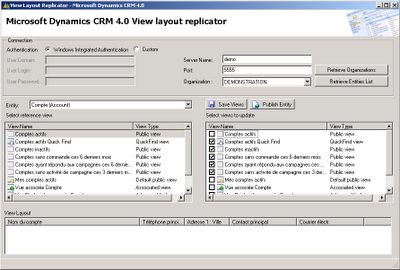
Hi, I announced this tool almost two months now and I'm proud to release it: the view layout replicator! This tool will save you lot of time (except if you like updating Xml by hand, anyway): You can desing only one view for an entity and then, use this tool to replicate the modifications to the other views. For example, we all customize "All active accounts" for our customer but how many do the same with all others public views and Quick Find, Advanced Find, Related View,etc? With this tool, you can replicate any view to any view except one product restrictions: There can't be associted entity column in a related view. Download:


Comments
http://promx.wordpress.com/2010/08/02/very-useful-microsoft-crm-tools-by-tanguy/
If you have any suggestions for the article, please let me know.
Regards
Sven
Thanks for talking about my tools, I love the article you wrote. I do agree with everything you said