Posts

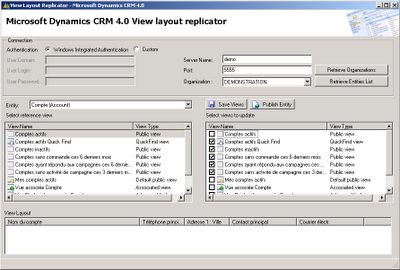
New Tool ! View Layout Replicator
Image
Hi, I announced this tool almost two months now and I'm proud to release it: the view layout replicator! This tool will save you lot of time (except if you like updating Xml by hand, anyway): You can desing only one view for an entity and then, use this tool to replicate the modifications to the other views. For example, we all customize "All active accounts" for our customer but how many do the same with all others public views and Quick Find, Advanced Find, Related View,etc? With this tool, you can replicate any view to any view except one product restrictions: There can't be associted entity column in a related view. Download:

MSCRM 4.0 update rollup 2

A new rollup is now available on Microsoft Download site. It seems to correct our bugs that appeared with rollup 1. Don't need to install rollup 1 before, if you didn't. Url: http://www.microsoft.com/downloads/details.aspx?familyid=aa671769-61e9-45c4-919f-c88199aa4241&displaylang=en&tm

JScript : know which action raised onSave event on form

Hi, I didn't have noticed a useful property for the onSave() method in crm Forms, I talk about the property "event.Mode". This property lets you know for which reason the onSave() method has been called: Here is the list of event: None : 0 Save : 1 SaveAndClose : 2 Delete : 3 Load : 4 Deactivate : 5 Reactivate : 6 Email Send : 7 Email Reply : 8 Email Forward : 9 Kb Submit : 10 Kb Reject : 11 Kb Publish : 12 Kb UnPublish : 13 Kb Rate : 14 Lead Unqualify : 15 Lead Qualify : 16 Quote Accept : 17 Quote CreateOrder : 18 Order ProcessOrder : 19 Opportunity AddRelatedOrder : 21 Opportunity AddRelatedQuote : 22 Opportunity AddRelatedInvoice : 23 Quote CreateRevision : 24 Quote CloseQuote : 25 Order CancelOrder : 26 Invoice Close : 27 Quote GetProducts : 28 Quote Activate : 29 Email ReplyAll : 30 Contract Hold : 31 Contract ReleaseHold : 32 Contract Cancel : 33 Contract Renew : 34 Product ConvertToKit : 35 Product ConvertFromKit : 36 ContractDetail Cancel : 37 Contract Invoice : 3...

Use your own parameters in Crm forms url

Hi all, Out of the box CRM 4.0 doesn't allow custom parameters in CRM Form url But you can change that! You must edit the MSCRM registry located in : HKEY_Local_Machine\Software\Microsoft\MSCRM Create a new DWORD named "DisableParameterFilter" and set it to 1. You can now use custom parameters!

Error when executing CRM v3 report in CRM v4 : Report render failure. Error: The 'CRM_FullName' parameter is missing a value

Hi, Get an apparently difficult error with my CRM 3.0 custom reports used in CRM 4.0. I got this unuseful generic error dialog box when executing my report. In the event viewer, I got the error message : Report render failure. Error: The 'CRM_FullName' parameter is missing a value But my dataset seemed correctly coded and everything worked fine using Business Intelligence Studio. In fact, due to the new report render mechanism in CRM 4.0, the user who executes the report is no more the current user but the application pool system account. So, what's the problem? In CRM 3.0, you used the following query to retrieve user name: select fullname from FilteredSystemUser where domainname = SUSER_SNAME() This not work anymore as the user executing the report is not the current user (in my case, was Network service which has no fullname). The solution is quite simple, see in standard reports how it works. You will find this query: select fullname from FilteredSystemUser where system...

Your report is empty when you execute it

When you execute a report, you can have a light blue empty screen instead of your report There's a KB article from Microsoft about this problem ( http://support.microsoft.com/kb/942672 ). In my case, the primary key field was correctly set to "Yes", so I just set it to "No", saved, and reset it to "Yes" and published the entity. It works now like a charm !

Error while installing CRM Microsoft.Crm.Setup.Server.CreateSetupUserAction

Image
If you try to install Microsoft Dynamics CRM on a server that was already used to test an installation, it is possible that the server keep the previous installation date and when you try the new installation, the trial period or the registration period may have expired. The message in the installation log will be : Error System.Exception: ActionMicrosoft.Crm.Setup.Server.CreateSetupUserAction failed. --->System.Runtime.InteropServices.COMException (0x8004415C): Exception fromHRESULT: 0x8004415C. The 0x8004415C code indicates that the CRM has expired To resolve this, keep the installation form and launch the registration wizard. Once you completed it, click Retry and everything should be OK