Posts

Showing posts with the label customization

Dynamics 365 CE v9 : Icons for entities

Image
With version 9 of Dynamics 365 Customer Engagement, Microsoft added a new type of image web resource : SVG files. They are vectorial images that can be used in any size. These images are used for Unified Client Interface, the new web interface also introduced in this version. So, when customizing custom entities, there is now three possibilities to define icons: Small icon, Medium icon and Vectorial icon Small icon : Used in the Solution Explorer and in the Lookup controls Solution explorer Lookup control This icon must have a size of 16 pixels by 16 pixels, transparent background and forecolor #5D5D5D Medium icon : Used in the standard web interface Site map This icon must have a size of 32 pixels by 32 pixels, transparent background and white forecolor Vectorial icon : Used in the Unified Client Interface Site map This icon must be a vectorial image with transparent background and black forecolor. D365 will adapt the color to render the icon properly. You can find icon for ...

Improved Iconator for XrmToolBox

Image
Hi Dynamics CRM community! It’s been a long time since the last article on this blog! Today, I want to share with you what’s new on Iconator plugin for XrmToolBox and where these changes come from. Believe it or not but,  in my day to day consultant work, I’m not customizing Dynamics CRM anymore but mainly focus on development. So, working with Dynamics CRM icons was not part of my job. But lately, I had to work on a project with me and myself only, so it did require that I create entities and update their icons to have a shiny CRM application. And even if Iconator is a helpful plugin, it was not helpful enough. The major concerns were: Cannot set entities color. You can do it in customizations but one by one entity. Icons used in SiteMap (the 32x32 pixels white ones) don’t fit well if the white color touch icon edges. This is particularly true with icons from FlatIcon.com (which I recommend, by the way) You know me, it couldn’t stay that way… So I updated Iconator plugins...

New XrmToolBox plugin : Chart Manager

Image
Just this once, the August release is published in July. Indeed, I’m on holidays this evening and I want to be sure everybody has the chance to get a new release of XrmToolBox with a new plugin : Chart Manager Chart Manager Chart Manager is a plugin that helps you to export/import charts from/to Microsoft Dynamics CRM in bulk. It also allows to edit the XML definition of a chart directly, without the need to export/import. XrmToolBox The toolbox itself and some plugins have been updated to fix bugs and add enhancements. The release note is available here . If you are already using XrmToolBox, you should have received an Update Notification. If not, just go to www.xrmtoolbox.com to download the latest version.

XrmToolBox first release on Github!

Image
Hi XrmToolBox friends, Today is a big day for XrmToolBox! First release on Github has been published and I have a lot of news to announce! XrmToolBox on Github I already made this announcement before but that’s official now, with this first release, XrmToolBox is hosted on Github and CodePlex project won’t receive updates anymore. You can reach this project on Github by following this link (or read following announcement) XrmToolBox home page XrmToolBox has its own home page now! You can bookmark www.xrmtoolbox.com . It has never been easier to find where XrmToolBox resides! If you are a XrmToolBox plugin developer, and you want me to provide you a subdomain of XrmToolBox.com, just ask (you can see the FetchXml Builder example here : http://fxb.xrmtoolbox.com ).  . New tool: FLS Bulk Updater! I don’t know if you already faced this scenario but I had to update 10 Field Security Profiles with more than 300 Fields Permissions. And it was a nightmare… Ok, you can select multi...

What’s new in XrmToolBox world

Image
If you are using the latest version of XrmToolBox, then you should see this popup when launching it This was the super cool hidden feature of the previous version! It works (I’m relieved…) In this new release of XrmToolBox, there is three new features, as described below Optimization in plugin development Thanks to Daryl LaBar, one of the developer of other XrmToolBox plugins, the way to develop plugins for XrmToolBox has never been so easy. All you have to do is to create a user control that inherits from PluginBase class. All the connectivity is handle by the base class and you just have to focus on what your tool should do. Daryl added also helper classes to handle asynchronous call in a really easy way. Read his blog article on this topic . The documentation on CodePlex project page explains how to use the new development model. A new tool : Metadata Browser Even if Microsoft delivers a metadata browser solution in the CRM SDK package, it is just a pain to install thi...

New XrmToolBox plugin : Bulk Form Attribute Manager

Image
And now a new version of XrmToolBox! This release includes a new plugin that will help you to apply some actions on attributes displayed in mutliples forms. The need for this tool came from a XrmToolBox user that has an entity with 180 forms. Imagine how long it takes to change one attribute property on each of these forms…. Nightmare! So, the tool will help you to change the following properties for an attribute on multiple forms: Label Visibility Read Only Lock The tool can also help you to add/remove an attribute on multiple forms. When adding an attribute, you need to specify next to which existing attribute this new field will be added. If available space, the attribute is just added. If no space available, a new row in the section is added before adding the new attribute. Some other tools in the toolbox have been fixed as some lists had a size problem (due to Visual Studio 2013 Update 3, as far as I can tell). That should now be fixed. Another great feature of the ...

New XrmToolBox plugin : Import/Export NN relationships

Image
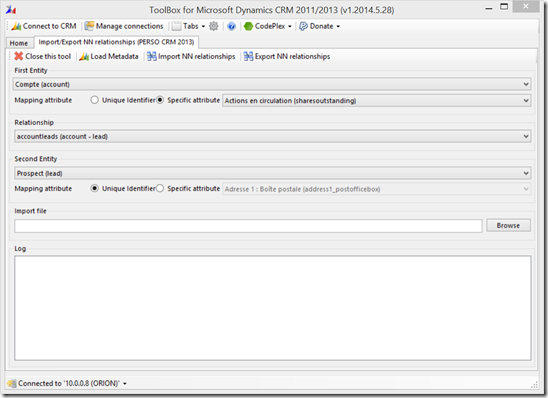
Two plugins in one day! wow! This one was, in fact, developed a couple of months ago. One of my colleague was using a solution from my fellow MVP Andrii Butenko which allows to import/export NN relationships in a silverlight web resource. This was nice but my colleague was using other attributes than primary key to do the mapping and Andrii’s solution does not support this. So he asked me to develop a XrmToolBox’s plugin that could do this. And, here it is! You can select entities and relationships and moreover, choose mapping attributes on both enitities. I only let text and number attributes selectable as other does not really make sense for mapping purposes. Then you can import or export NN relationships! Here is a preview As usual, this plugin, among other, is available with XrmToolBox on CodePlex

New XrmToolbox Plugin : Solution Components Mover

Image
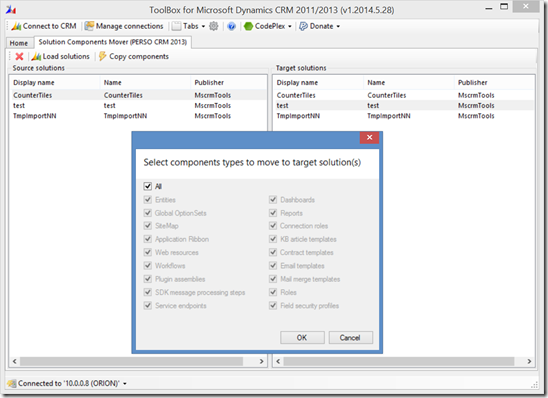
Hey guys, Here is another tool for the XrmToolBox! This one, like the previous one, was asked by a member of the community (by the way, he is the same guy than for Synchronous event order editor). It allows you to move all or defined components from a solution to another one. What’s the point? Well, when working on a specific feature, you might want to isolate the corresponding items in a specific solution. When the feature is completed, you want to transfer components from your specific solution to the deliverable solution. Instead of adding each type of components, one by one, this tool helps you add them in a bulk.! Here’s a preview As usual, this plugin, among other, is available with XrmToolBox on CodePlex

New XrmToolBox plugin! Form Libraries Manager

Image
Last month, I had to work on some JavaScript web resources cleaning and I wanted to rename all my web resources. This is not so complicated when using the Web Resources Manager plugin to drag and drop JavaScript files to some new folders. The difficult part was to update all forms that used some shared web resources like JSON2, jQuery and XrmServiceToolkit. So, I decided to write… a plugin for the XrmToolBox. So, let me introduce the Form Libraries Manager This plugin can list all JavaScript web resources and all forms (only active forms for CRM 2013). You can select web resources to add and forms where to add them. If multiple web resources are selected, you can order them and choose where to display them : at the beginning of the scripts list for forms or at the end. I’m sure this will help people to initialize all their forms with required web resources. It can also remove in bulk selected libraries. For each selected library, if it is used by a form event, a warning is display...

New XrmToolBox plugin : Form Parameter Manager

Image
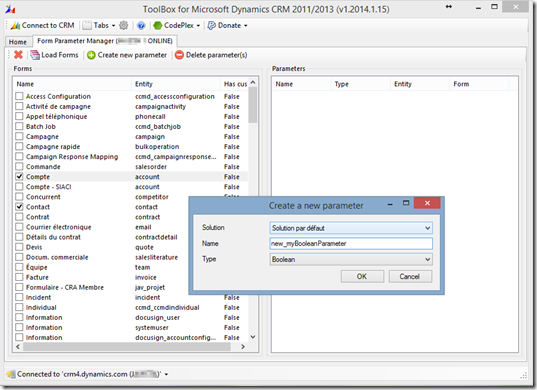
Today, I’m releasing a new plugin for my XrmToolBox application! This plugin has been asked by one of my fellow MVP, Dave Berry. This plugin helps you to create and delete form parameters in bulk. Without this tool, you should open each form properties panel to create the parameter required. The same operation apply when you need to delete them. So, again, it’s a productivity tool. Here is what it looks like: You can load all forms. They are listed with a boolean that indicates if custom parameters already exist for selected forms. You can create parameters in bulk. The panel on the right side list parameters included in selected forms from the panel on the left side. As usual, the XrmToolBox with all its plugins (currently 17!) can be downloaded from CodePlex If this plugin (and the other ones) improve your productivity, you should consider rating the tool on CodePlex or making a small donation

New XrmToolBox Plugin : Easy Translator

Image
Hi all, As I wrote few weeks ago, I was working on a translation tool. It is now finished and available as a XrmToolBox plugin. The features are described in my previous post Just few more info: I tried to include ribbon items translation. Even if I was able to export ribbon labels, there is no way to update them directly using SDK (except exporting/importing solutions). After having exported translations, please do not change anything on the Excel workbook structure, especially sheets name and colorized cells. When using this tool, please backup your organization before importing translations. I made some test but can’t assure there is no risk even if I’m only using supported methods Here's what the interface looks like As usual, to download it, go to CodePlex

What to expect for my new tool to come

Image
Last week, David J. was asking to the MVP list how to get more accurate data when comes the time to translate CRM customizations. His concern was to get contextual information about the terms to translate. I can only agree with him… When exporting translations, you just get an ID and the term to translate. You don’t know where it is used… So my next tool will be a tool that exports data to translate, but with contextual information. The tool will of course be able to import these data back to the CRM application. Export and import will be managed in a supported way using web services only. What will be included Entity names and descriptions Attribute name and description Boolean, Picklist, State and Status OptionSet Attribute labels View name and description Form name and description Form Tabs name Form Section name Form Field name All these items have been tested successfully on UR12 organization. I still need to check if new forms are structured in the same way th...

New tool: Iconator for Microsoft Dynamics CRM 2011

Image
Maybe you remember CRM 4.0 days where it was possible to use Microsoft’s Demonstration tool to update quickly entity icons… There is no such tool for CRM 2011 since UI allows us to define icons for custom entities based on available image web resources. The boring thing is when you need to update multiple entities: you have to create web resources first, then for each entity, specify large icon and small icon. So, I’m sure you already understand what’s happening: Here is a new tool that will allows you bulk update custom entities icons: The iconator (thanks to Julie and George for finding the name ) This tool has been developed in collaboration with my colleague at Javista, Lloyd Sebag (Credits go to him for starting this project) Features Connect to any type of Microsoft Dynamics CRM 2011 deployment (OnPremise, IFD, Online, Online with Office 365) Apply icons to multiple entities in a single action Load new image web resources Reset entities to default icons Screenshots Wh...

Ultimate ribbon designer : Ribbon Workbench (beta)

Image
If you are used to follow my blog, you know I developed some tools around Dynamics CRM 2011 ribbons: Ribbon Browser and Ribbon Editor . I think these tools are not useful anymore, since Develop 1 provides an incredible tool, packaged in a CRM 2011 solution that allows you to design ribbons using drag and drop in an amazing UI. It is now just a matter of minutes to add a new control on a ribbon (not only buttons). See the list of supported item below: To download this tool, just go to develop 1 website This tool is still in beta version but is much better than any other tool I know. It promises the best for future release!

New tool : Solution Import for Microsoft Dynamics CRM 2011

Image
Hi, Today, I released a little tool to ease the import of solution in Microsoft Dynamics CRM 2011. It displays a simple UI where you can : change import settings Drag & drop a solution file (Zip) Define a path containing the extraction of a solution file I hope this will help you a bit... As usual, the tool is on CodePlex Enjoy!

Tool Update : Searchable Property Updater for CRM 2011 (1.1.919.75)

Image
One of my fellow MVP asked me for the possibility to display if an attribute is displayed on at least one entity form. This will ease the decision to make an attribute valid for advanced find. I thought it was difficult because of the need to export a solution to get the xml of an entity forms. But it can be achieved a lot more easily! Entity forms, in Microsoft Dynamics CRM 2011, are just like any other entity, so you can simply retrieve the forms with a simple QueryExpression (or QueryByAttribute, in my case). The code sample: QueryByAttribute qba = new QueryByAttribute( "systemform" ); qba.Attributes.AddRange( "objecttypecode" , "type" ); qba.Values.AddRange(entityLogicalName, 2); qba.ColumnSet = new ColumnSet( true ); EntityCollection ec = oService.RetrieveMultiple(qba); So, this new version is much more useful since you can see easily if an attribute is used on a form, and you can also check only attributes used in at least one form by pressing ...

New tool: SiteMap Editor for Microsoft Dynamics CRM 2011

Image
With the last version of Microsoft Dynamics CRM, you can organize your customizations through solutions and this is really a nice feature. But some specific actions are taking really more time than with previous versions… This is exactly the problem when you want to edit the SiteMap. You have to add the SiteMap to a solution (maybe create one before), export the solution, extract the solution, update the Xml, zip the files, import the solution (should I need to continue with import wizard steps…? ) So, today, I release my new tool, the SiteMap Editor. It works like the IsvConfigManager for Microsoft Dynamics CRM 4.0 to edit the SiteMap. Features Connections to OnPremise, Online and Claim based deployments TreeView display of SiteMap Add SiteMap component with mouse usage Add default SiteMap component if you removed one Cut/Copy/Paste of SiteMap component Display Xml of SiteMap component Add SiteMap component from Xml Reset SiteMap to default system one Import back the Site...

New tool: JavaScript Web Resource Manager for Microsoft Dynamics CRM 2011

Image
I didn’t find a way to provide you a JavaScript editor as flexible as the one I created for Microsoft Dynamics CRM 4.0 since the scripts are now in two parts in Microsoft Dynamics CRM 2011: web resource and script call from forms… Anyway, this new tool allows you to update JavaScript web resources with the following features: Export scripts web resources from CRM server Save scripts web resources to disk Load scripts files from disk Edit scripts with default text editor or Visual Studio Edit web resource properties Save scripts to CRM server Publish scripts to CRM server It should help you avoid multiple clicks as soon as you want to update a JavaScript web resource… As usual with my tools for CRM 2011, it is published on codeplex Just a small reminder : a Paypal donation button is just on the right part of this blog   But it’s up to you… Screenshot

How to: Change existing ribbon element properties

Image
Today, I will try to explain you how to change properties of existing ribbon elements. For this example, I will change the label and icon of the button “New opportunity” in the main grid ribbon of the entity “Opportunity”. The standard ribbon for the opportunity looks like the below one: And the result I expect: To obtain this result, follow the below procedure: 1 - If it is not already done, download the SDK ( click here ). 2 - Open the SDK folder “samplecode \ cs \ client \ ribbon \ exportribbonxml \ exportedribbonxml”. Then open the Xml file corresponding to the entity (here opportunity.xml). In our case, the button “Nouveau” (or “New” in english), is the one we need to retrieve: < Button Id ="Mscrm.HomepageGrid.opportunity.NewRecord" ToolTipTitle ="$Resources:Ribbon.HomepageGrid.MainTab.New" ToolTipDescription ="$Resources(EntityDisplayName):Ribbon.Tooltip.New" Command ="Mscrm.NewRecordFromGrid" Sequence ="10" Label...

My CRM 2011 tools are now Claim based authentication compatible

Image
Everything is on the title Please take time to rate my tools on codeplex if you like them and if you really like them, you can even make a donation (see Paypal button on your right) Many thanks to Alex Fagundes and PowerObjects for providing me a Claim Based authentication organization on their servers. It helps me a lot for testing my tools. I owe you one, Alex !