Posts

Showing posts with the label Attribute

New XrmToolBox plugin : Attribute Usage Inspector

Image
A colleague of mine recently asked if it was possible to inspect data usage to determine which attributes are useless in a CRM 2016 organization because not filled with any value. My first answer was: no. I used to know a solution named CRM Data Detective that does the same but for CRM 4 and CRM 2011 only. Ok, I was wrong and found out that a version for CRM 2015/2016 also exists. Anyway, the major problem with this solution is the fact that if the entity you want to inspect has more records than the AggregateQueryRecordsLimit (which is 50,000 in CRM Online and cannot be updated), then you don’t get real usage statistics. This plugin resolves this limitation by querying actual records instead of performing aggregation query (only if aggregation query fails because of the limit). This can impact performance but if you really needs it, you get it. You can also export the result in a raw Excel file. Here is a screenshot As usual, please use the Plugins Store in XrmToolBox to get th...

New XrmToolBox plugin : Bulk Form Attribute Manager

Image
And now a new version of XrmToolBox! This release includes a new plugin that will help you to apply some actions on attributes displayed in mutliples forms. The need for this tool came from a XrmToolBox user that has an entity with 180 forms. Imagine how long it takes to change one attribute property on each of these forms…. Nightmare! So, the tool will help you to change the following properties for an attribute on multiple forms: Label Visibility Read Only Lock The tool can also help you to add/remove an attribute on multiple forms. When adding an attribute, you need to specify next to which existing attribute this new field will be added. If available space, the attribute is just added. If no space available, a new row in the section is added before adding the new attribute. Some other tools in the toolbox have been fixed as some lists had a size problem (due to Visual Studio 2013 Update 3, as far as I can tell). That should now be fixed. Another great feature of the ...

Metadata Document Generator is back!

Image
Today, and after a long time since the XrmToolBox was released, the Metadata Document Generator tool is now available as a plugin for the toolbox. It provides the same features than the previous stand alone version, with some extra: You can add location of attributes in forms You can select attributes NOT on forms And still: Excel or Word output (thanks to GemBox Software API) Language selection (if multi language enable on organization) Attributes selection: all attributes optionset and boolean attributes only attributes used in forms attributes not used in forms (new) attributes selected manually Attributes metadata selection Save/load settings to avoid losing time replaying the same document generation As usual the tool is available as part of the XrmToolBox application, on CodePlex

Tool Update : Searchable Property Updater for CRM 2011 (1.1.919.75)

Image
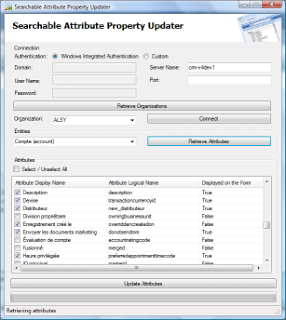
One of my fellow MVP asked me for the possibility to display if an attribute is displayed on at least one entity form. This will ease the decision to make an attribute valid for advanced find. I thought it was difficult because of the need to export a solution to get the xml of an entity forms. But it can be achieved a lot more easily! Entity forms, in Microsoft Dynamics CRM 2011, are just like any other entity, so you can simply retrieve the forms with a simple QueryExpression (or QueryByAttribute, in my case). The code sample: QueryByAttribute qba = new QueryByAttribute( "systemform" ); qba.Attributes.AddRange( "objecttypecode" , "type" ); qba.Values.AddRange(entityLogicalName, 2); qba.ColumnSet = new ColumnSet( true ); EntityCollection ec = oService.RetrieveMultiple(qba); So, this new version is much more useful since you can see easily if an attribute is used on a form, and you can also check only attributes used in at least one form by pressing ...

New tool: Searchable Property Updater for Microsoft Dynamics CRM 2011

Image
Today, I finished the upgrade of Searchable Property Updater for Microsoft Dynamics CRM 2011. I posted the tool, the source code and the documentation on codeplex. Use the link below to access to these files: http://searchpropupdater.codeplex.com   As english is not my native language, if someone would like to help me improving the documentation, I will be happy to receive some help.

Searchable Propery Attribute Updater

Image
Hi, The previous post was not the last one... :) You can find in this post the first tool that will make your life easier: Just remember when you customer asked you to remove all these unused attributes form the attribute list of the advanced find form... You navigated through all attrbutes form to modify the Searchable property of each attributes for hours... (maybe am I exaggerating a bit...) The program I give you allows you to update all attributes in a single winform application! Yes it can be! Do not hesitate to give me your comments about this program if you think improvements can be done... Download: