Posts

New XrmToolBox plugin : Portal Records Mover
Image
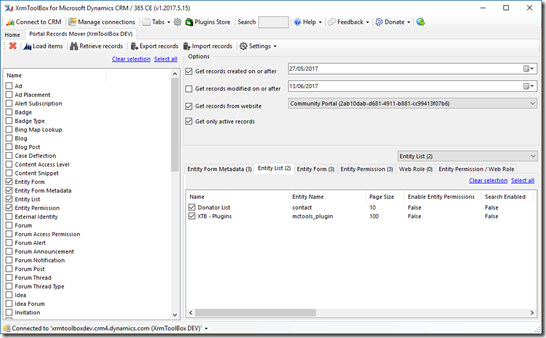
Hi Dynamics 365 community! Today, I’m releasing a new plugin for XrmToolBox : Portal Records Mover This plugin come from the need to export/import portal records that have been created/updated since a specific date. I implemented a portal for one of my customer last year and he updated pages content and some other portal records. This portal needs new features so we added new portal records in our development organization. But it is not an option to deliver again these pages since it would overwrite customer changes. So I needed a way to deliver only specific portal records. So, how to do it easily? I cannot use Configuration Migration from CRM SDK since it would export all records for defined entities, not only the newly created or modified ones. I cannot use standard export because I would need to export multiples entities and even NN relationships and manage import of multiple files. I could use custom code to export/import records… Better! I can now use an XrmToolBox pl...

Display Performance Center in Chrome

Today, I was assigned a task to compare form load performance between available browsers for Windows (ie Chrome, FireFox, IE and Edge). You might be aware that Dynamics CRM/365 include a performance center you can use by pressing Ctrl+Shift+Q. Once activated, it records load times and helps you understand your form load performance. More information here This performance center is available in all browsers (at least with CRM 2016+) but the key combination closes Chrome! A small tip then, you can create a bookmark with the following target : javascript:Mscrm.Performance.PerformanceCenter.get_instance().TogglePerformanceResultsVisibility() Or you can also use the Chrome extension Level Up

New XrmToolBox plugin : Attribute Usage Inspector

Image
A colleague of mine recently asked if it was possible to inspect data usage to determine which attributes are useless in a CRM 2016 organization because not filled with any value. My first answer was: no. I used to know a solution named CRM Data Detective that does the same but for CRM 4 and CRM 2011 only. Ok, I was wrong and found out that a version for CRM 2015/2016 also exists. Anyway, the major problem with this solution is the fact that if the entity you want to inspect has more records than the AggregateQueryRecordsLimit (which is 50,000 in CRM Online and cannot be updated), then you don’t get real usage statistics. This plugin resolves this limitation by querying actual records instead of performing aggregation query (only if aggregation query fails because of the limit). This can impact performance but if you really needs it, you get it. You can also export the result in a raw Excel file. Here is a screenshot As usual, please use the Plugins Store in XrmToolBox to get th...

Improved Iconator for XrmToolBox

Image
Hi Dynamics CRM community! It’s been a long time since the last article on this blog! Today, I want to share with you what’s new on Iconator plugin for XrmToolBox and where these changes come from. Believe it or not but,  in my day to day consultant work, I’m not customizing Dynamics CRM anymore but mainly focus on development. So, working with Dynamics CRM icons was not part of my job. But lately, I had to work on a project with me and myself only, so it did require that I create entities and update their icons to have a shiny CRM application. And even if Iconator is a helpful plugin, it was not helpful enough. The major concerns were: Cannot set entities color. You can do it in customizations but one by one entity. Icons used in SiteMap (the 32x32 pixels white ones) don’t fit well if the white color touch icon edges. This is particularly true with icons from FlatIcon.com (which I recommend, by the way) You know me, it couldn’t stay that way… So I updated Iconator plugins...

Welcome to the XrmToolBox Plugins Store

Image
Wow! It's been a long time since I did not write an article on my blog! Today, I'm releasing the April 2016 version of XrmToolBox. This new version comes with an integrated plugins store. So, what does it mean? It means each and every developer can share his/her XrmToolBox plugins without the need to ask me permissions or help to distribute the plugins across the world. Here is what the Plugins Store looks like As you can see, Jonas Rapp and Daryl Labar already shared their plugins through this new channel. To install their plugins, just select them and click on "Install selected packages" button and you are good to go! The Plugins store is also capable to detect that a new version of an installed plugin is available and let syou update it. The Plugins store is launched automatically after XrmToolBox startup but you can disable this in the store form itself or in XrmToolBox options. The Plugins Store is also available from the main application toolbar....

New XrmToolBox plugin : Chart Manager

Image
Just this once, the August release is published in July. Indeed, I’m on holidays this evening and I want to be sure everybody has the chance to get a new release of XrmToolBox with a new plugin : Chart Manager Chart Manager Chart Manager is a plugin that helps you to export/import charts from/to Microsoft Dynamics CRM in bulk. It also allows to edit the XML definition of a chart directly, without the need to export/import. XrmToolBox The toolbox itself and some plugins have been updated to fix bugs and add enhancements. The release note is available here . If you are already using XrmToolBox, you should have received an Update Notification. If not, just go to www.xrmtoolbox.com to download the latest version.

New XrmToolBox version and MVP award

Image
Hi everybody, First of all, maybe you already saw it on social networks but I’' have been renewed as a Microsoft Dynamics CRM MVP for the 6th time! Great honor to be part of the CRM MVP group again and thanks to all XrmToolBox users that  make this possible. Regarding XrmToolBox, I just released a new version today. New plugins management It is a breaking change version since plugins management have been revamped to use Microsoft Extensibilty Framework, which means plugins need to be migrated to this new plugins mechanism to work. This new mechanism helps to manage plugins automatically with no custom code, and also allow to deliver files with multiples plugins inside. If you use plugins other than ones shipped with XrmToolBox, you might want to keep the previous version available until other plugins are migrated. Of course, all plugins shipped with XrmToolBox are compatible. Usage statistics I aslo implemented a new mechanism that will help me and other developers to unders...