Posts

New XrmToolBox plugin : Import/Export NN relationships
Image
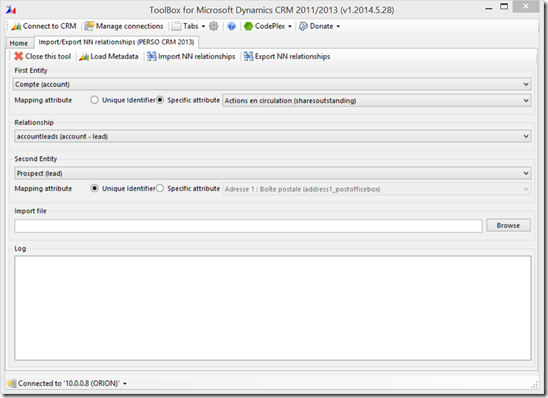
Two plugins in one day! wow! This one was, in fact, developed a couple of months ago. One of my colleague was using a solution from my fellow MVP Andrii Butenko which allows to import/export NN relationships in a silverlight web resource. This was nice but my colleague was using other attributes than primary key to do the mapping and Andrii’s solution does not support this. So he asked me to develop a XrmToolBox’s plugin that could do this. And, here it is! You can select entities and relationships and moreover, choose mapping attributes on both enitities. I only let text and number attributes selectable as other does not really make sense for mapping purposes. Then you can import or export NN relationships! Here is a preview As usual, this plugin, among other, is available with XrmToolBox on CodePlex
New XrmToolbox Plugin : Solution Components Mover

Image
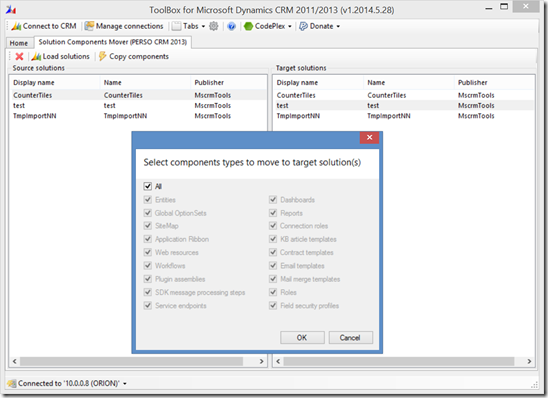
Hey guys, Here is another tool for the XrmToolBox! This one, like the previous one, was asked by a member of the community (by the way, he is the same guy than for Synchronous event order editor). It allows you to move all or defined components from a solution to another one. What’s the point? Well, when working on a specific feature, you might want to isolate the corresponding items in a specific solution. When the feature is completed, you want to transfer components from your specific solution to the deliverable solution. Instead of adding each type of components, one by one, this tool helps you add them in a bulk.! Here’s a preview As usual, this plugin, among other, is available with XrmToolBox on CodePlex

New XrmToolBox plugin : Synchronous events execution order editor

Image
Last week, I receive a request from Rob Boyers that was asking for a tool that can help him to order execution order of synchronous events, plugin steps and workflows. Indeed, in Dynamics CRM 2013, you can set the “rank” property of a plugin step to define its execution order among other steps in the same message and stage, using the PluginRegistrationTool. Unfortunately, there is no such way to edit the “rank” property of a synchronous workflow in a UI. So, here is the “Synchronous events execution order editor”, a new XrmToolBox plugin It works only with CRM 2013 and loads all synchronous plugin steps and workflows and group them by Entity, Message and Stage. When selecting a stage, you can see all events registered and you can update the rank value. Then, just click on the button “Apply update(s)” to update events on the organization. Just a note: for synchronous workflows that are activated, they will be deactivated, updated then activated back. As usual, the XrmToolBox and i...

XrmToolBox : Donate and get rid of the sponsor screen

Image
You may have noticed that latest releases of XrmToolBox embed a sponsor screen that is displayed once a week. This sponsor screen is here to remind you to support my work, by rating the tool on CodePlex or by making a donation. As a reminder, the screen looks like this: If you want to get rid of this screen, you must make a donation. When I get a donation, I send the donor a license file that removes the screen and adds a message of thanks on the start screen, see below. The message may include your name and your company name if you want. You can also be listed as a XrmToolBox sponsor on the Donators list on this blog. If you're wondering what to serve me money from your donations, my goal is to buy a Surface 2 Pro for a true mobile computer and to continue to develop XrmToolBox anywhere! So you know what you have to do

XrmToolBox continues to grow

Image
I just released a new version of my toolbox with two new “features”: A new tool developed by my colleague Damien (DamSim) that will allow you to copy a view from one organization to an other. This is the View Transfer Tool. A new way to manage your connections. Some users reported that it was difficult to find where to manage connections. You have now the possibility to display connections list by clicking the button “Manage connections” in the toolbar of the toolbox. This will display the list of connections and let you create, update or delete connections. You can also notice that this list exposes the version of the organization. it will help you determine which rollup is installed on your organizations. This number is updated each time you connect to the organization. This updates is obviously available on CodePlex Moreover, I’m pretty excited because I have been in touch with a developer from a well known Microsoft Dynamics CRM partner that should release a bunch of p...

Storing custom configuration settings in Microsoft Dynamics CRM

Image
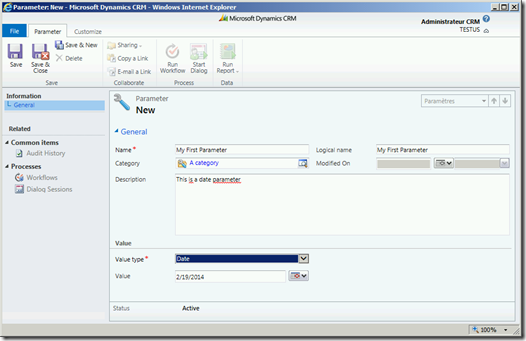
Since some years, I’m using two custom entities to store some parameters used in JavaScript, Plugins and Custom Workflow Activities. As I have been asked to share them with the community, I’m doing it today? I have created a managed solution that contains these two entities: Parameters Category : Used to define parameters groups Category : This is the main entity that stores the parameter with the following attributes: Name : This is a display name that can be changed anytime Logical name : This is a name editable only during creation Category : To indicate in which group of parameters the parameter belongs Description : no need of explanation here Value type : define the type of value Value : depending of the type, the appropriate control is displayed. When saving the value is also copied to a global text attribute named “global value” This way, I can store typed parameters for multiple usages: Storing counter current value Storing url of an external applicati...

Change the default dashboard in Dynamics CRM 2013 with XrmToolBox SiteMap Editor plugin

Image
I updated the SiteMapEditor to allows you to change the default dashboard that is displayed when navigating to a Dashboard SubArea in Dynamics CRM 2013. To do so, follow this procedure: Connect the XrmToolBox to your organization Open SiteMapEditor plugin Load the SiteMap Navigate to an area that is a dashboard page Click on the “Browse” (…) button in the details panel (Default Dashboard Id) Select the dashboard that should be displayed when navigating to this SubArea Save the SubArea item Update the SiteMap Please note that this feature is only available in Dynamics CRM 2013 and Dynamics CRM Online Fall '13 Service Update. If you try to use this feature in CRM 2011, you will get the following error: