Posts

Use feature flags in your plugins

Lately, there was a discussion on Twitter about the best practice to handle plugins: One class per plugin? One project per plugin? or anything else? On my side, I'm using one project for all the plugins for the same customer. This is what I answered on Twitter. Then came a question : How do I handle the fact that some plugins may have not been tested or completed yet and I need to release the plugins assembly. The answer was : Feature flag! What is a feature flag? It's a concept that will allow to enable/disable some features or portion of code depending on a configuration. Let's take an example where a plugin must execute two features : Feature A and Feature B public class MyPlugin : IPlugin { public void Execute(IServiceProvider serviceProvider) { var service = new MyCustomService(); service.ExecuteFeatureA(); service.ExecuteFeatureB(); } } We need to find a way to execute conditionally these methods, let's say because feature B ...

What is coming in July’18 release of XrmToolBox

Image
Hi XrmToolBox community! As there is some interesting new features coming in next release, I wanted to write a blog post rather than just a release note on XrmToolBox portal. I would like to focus on three new features today. Connecting to D365 Online using Multi Factor Authentication (MFA) It has been a much requested feature since months, so I’m really happy to give you the capability to connect with an account protected with MFA. It was  already possible by using Connection String but you can now connect using UI only. When ticking the MFA checkbox, you will be presented with a new connection wizard step that requires you to provide information about an Azure AD Application (AppId and Reply Url). You get it, MFA requires this kind of application. You may need to asked your Office 365 admin to create the application. This step provides a link to explain how to create an Azure AD application for Microsoft Dynamics 365. Highlighting environmen...

Dynamics 365 CE v9 : Icons for entities

Image
With version 9 of Dynamics 365 Customer Engagement, Microsoft added a new type of image web resource : SVG files. They are vectorial images that can be used in any size. These images are used for Unified Client Interface, the new web interface also introduced in this version. So, when customizing custom entities, there is now three possibilities to define icons: Small icon, Medium icon and Vectorial icon Small icon : Used in the Solution Explorer and in the Lookup controls Solution explorer Lookup control This icon must have a size of 16 pixels by 16 pixels, transparent background and forecolor #5D5D5D Medium icon : Used in the standard web interface Site map This icon must have a size of 32 pixels by 32 pixels, transparent background and white forecolor Vectorial icon : Used in the Unified Client Interface Site map This icon must be a vectorial image with transparent background and black forecolor. D365 will adapt the color to render the icon properly. You can find icon for ...

Dynamics Portals : Add a local login control on the home page

Image
Dynamics portals are a great solution to create portals and expose Dynamics 365 data to people not using our beloved XRM application.   One of our customers asked us to have a login control directly on the home page instead of having to click on “Sign In” link, then show the login page, then log… I think you got it.   The problem is the login page is a hidden page that cannot be customized. So, I found a (dirty) way to handle this request.   First, create your own login control In my home page template, I added two input controls and two buttons (Sign In and Lost password), like below, nothing fancy. The code is the following   < h3 > Identifiez vous </ h3 > < div style = " display : none ; " id = "loginMessage" class = "alert alert-danger" > </ div > < div > < div class = "form-group" > < label for = "txtLogin" > Nom d'utilisateur </ label > ...

New XrmToolBox plugin : Portal Records Mover

Image
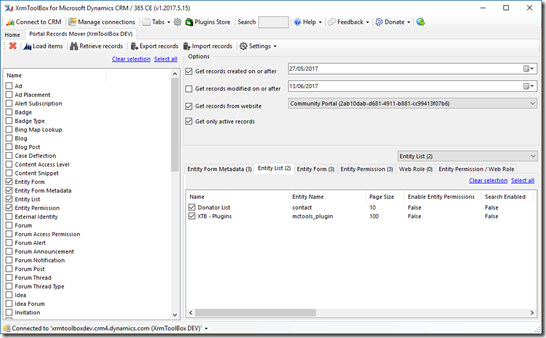
Hi Dynamics 365 community! Today, I’m releasing a new plugin for XrmToolBox : Portal Records Mover This plugin come from the need to export/import portal records that have been created/updated since a specific date. I implemented a portal for one of my customer last year and he updated pages content and some other portal records. This portal needs new features so we added new portal records in our development organization. But it is not an option to deliver again these pages since it would overwrite customer changes. So I needed a way to deliver only specific portal records. So, how to do it easily? I cannot use Configuration Migration from CRM SDK since it would export all records for defined entities, not only the newly created or modified ones. I cannot use standard export because I would need to export multiples entities and even NN relationships and manage import of multiple files. I could use custom code to export/import records… Better! I can now use an XrmToolBox pl...

Display Performance Center in Chrome

Today, I was assigned a task to compare form load performance between available browsers for Windows (ie Chrome, FireFox, IE and Edge). You might be aware that Dynamics CRM/365 include a performance center you can use by pressing Ctrl+Shift+Q. Once activated, it records load times and helps you understand your form load performance. More information here This performance center is available in all browsers (at least with CRM 2016+) but the key combination closes Chrome! A small tip then, you can create a bookmark with the following target : javascript:Mscrm.Performance.PerformanceCenter.get_instance().TogglePerformanceResultsVisibility() Or you can also use the Chrome extension Level Up

New XrmToolBox plugin : Attribute Usage Inspector

Image
A colleague of mine recently asked if it was possible to inspect data usage to determine which attributes are useless in a CRM 2016 organization because not filled with any value. My first answer was: no. I used to know a solution named CRM Data Detective that does the same but for CRM 4 and CRM 2011 only. Ok, I was wrong and found out that a version for CRM 2015/2016 also exists. Anyway, the major problem with this solution is the fact that if the entity you want to inspect has more records than the AggregateQueryRecordsLimit (which is 50,000 in CRM Online and cannot be updated), then you don’t get real usage statistics. This plugin resolves this limitation by querying actual records instead of performing aggregation query (only if aggregation query fails because of the limit). This can impact performance but if you really needs it, you get it. You can also export the result in a raw Excel file. Here is a screenshot As usual, please use the Plugins Store in XrmToolBox to get th...

Improved Iconator for XrmToolBox

Image
Hi Dynamics CRM community! It’s been a long time since the last article on this blog! Today, I want to share with you what’s new on Iconator plugin for XrmToolBox and where these changes come from. Believe it or not but,  in my day to day consultant work, I’m not customizing Dynamics CRM anymore but mainly focus on development. So, working with Dynamics CRM icons was not part of my job. But lately, I had to work on a project with me and myself only, so it did require that I create entities and update their icons to have a shiny CRM application. And even if Iconator is a helpful plugin, it was not helpful enough. The major concerns were: Cannot set entities color. You can do it in customizations but one by one entity. Icons used in SiteMap (the 32x32 pixels white ones) don’t fit well if the white color touch icon edges. This is particularly true with icons from FlatIcon.com (which I recommend, by the way) You know me, it couldn’t stay that way… So I updated Iconator plugins...

Welcome to the XrmToolBox Plugins Store

Image
Wow! It's been a long time since I did not write an article on my blog! Today, I'm releasing the April 2016 version of XrmToolBox. This new version comes with an integrated plugins store. So, what does it mean? It means each and every developer can share his/her XrmToolBox plugins without the need to ask me permissions or help to distribute the plugins across the world. Here is what the Plugins Store looks like As you can see, Jonas Rapp and Daryl Labar already shared their plugins through this new channel. To install their plugins, just select them and click on "Install selected packages" button and you are good to go! The Plugins store is also capable to detect that a new version of an installed plugin is available and let syou update it. The Plugins store is launched automatically after XrmToolBox startup but you can disable this in the store form itself or in XrmToolBox options. The Plugins Store is also available from the main application toolbar....

New XrmToolBox plugin : Chart Manager

Image
Just this once, the August release is published in July. Indeed, I’m on holidays this evening and I want to be sure everybody has the chance to get a new release of XrmToolBox with a new plugin : Chart Manager Chart Manager Chart Manager is a plugin that helps you to export/import charts from/to Microsoft Dynamics CRM in bulk. It also allows to edit the XML definition of a chart directly, without the need to export/import. XrmToolBox The toolbox itself and some plugins have been updated to fix bugs and add enhancements. The release note is available here . If you are already using XrmToolBox, you should have received an Update Notification. If not, just go to www.xrmtoolbox.com to download the latest version.

New XrmToolBox version and MVP award

Image
Hi everybody, First of all, maybe you already saw it on social networks but I’' have been renewed as a Microsoft Dynamics CRM MVP for the 6th time! Great honor to be part of the CRM MVP group again and thanks to all XrmToolBox users that  make this possible. Regarding XrmToolBox, I just released a new version today. New plugins management It is a breaking change version since plugins management have been revamped to use Microsoft Extensibilty Framework, which means plugins need to be migrated to this new plugins mechanism to work. This new mechanism helps to manage plugins automatically with no custom code, and also allow to deliver files with multiples plugins inside. If you use plugins other than ones shipped with XrmToolBox, you might want to keep the previous version available until other plugins are migrated. Of course, all plugins shipped with XrmToolBox are compatible. Usage statistics I aslo implemented a new mechanism that will help me and other developers to unders...

XrmToolBox version 1.2015.6.9

Image
Today, I released a new version of XrmToolBox that is mainly a maintenance release (see release note for details). Nevertheless, two enhancements have been made to the XrmToolBox application: Search bar has now focus when XrmToolBox is open: This will avoid an extra click to reach search bar, so you can start typing the tool you want to use as soon as XrmToolBox is displayed Connection selection dialog now has a “Most Recently used” feature that allows to display connections that have been used recently so when you often work on the same organizations, these connections are displayed on top of the connection list Without “Most Recently used” feature activated With “Most Recently used” feature activated As usual, this release is available for download on www.xrmtoolbox.com

New XrmToolBox version : v1.2015.5.6

A new version of XrmToolBox is available! No new tools from me but some bug fixes and enhancements. The release note is available here . Just be aware that plugins are now stored in a subfolder “Plugins” in “XrmToolBox” folder. This is to ensure XrmToolBox.exe is found easily in the main folder. If you are a XrmToolBox plugin developer and your plugin is storing its own settings file, then please check if everything is still working. Other plugins Maybe you already know it but XrmToolBox github wiki page lists available plugins for XrmToolBox. Some new plugins were added lately so please have a look here

XrmToolBox first release on Github!

Image
Hi XrmToolBox friends, Today is a big day for XrmToolBox! First release on Github has been published and I have a lot of news to announce! XrmToolBox on Github I already made this announcement before but that’s official now, with this first release, XrmToolBox is hosted on Github and CodePlex project won’t receive updates anymore. You can reach this project on Github by following this link (or read following announcement) XrmToolBox home page XrmToolBox has its own home page now! You can bookmark www.xrmtoolbox.com . It has never been easier to find where XrmToolBox resides! If you are a XrmToolBox plugin developer, and you want me to provide you a subdomain of XrmToolBox.com, just ask (you can see the FetchXml Builder example here : http://fxb.xrmtoolbox.com ).  . New tool: FLS Bulk Updater! I don’t know if you already faced this scenario but I had to update 10 Field Security Profiles with more than 300 Fields Permissions. And it was a nightmare… Ok, you can select multi...

XrmToolBox new version : Welcome CRM 2015

Image
XrmToolBox previous version was a great success : More than 5K downloads, 13 ratings with an average rate of 4,7/5. So today, I’m proud to release a new version of XrmToolBox. This is kind of a major version since a lot of changes are included in this release. Please read blow CRM 2015 and .Net Framework 4.5.2 This release is the version of XrmToolBox to use CRM 2015 SDK assemblies. That means plugins for XrmToolBox can now uses new capabilities of CRM 2015 SDK (of course, it can still connect to CRM 2011 and 2013). That means above all that XrmToolBox now requires .Net Framework 4.5.2. When launching this new version, if your computer does not contain this version of .Net Framework, you will be prompt to download and install it. Signed assemblies Thanks to Digicert.com which provides free code signing certificate to Microsoft MVP’s, files that are shipped with XrmToolBox package are now all digitally signed. That means you can check if files your are using with XrmToolBox come f...

New XrmToolBox release : control your plugins list easily

Image
Today, I released a new version of XrmToolBox. No new tool in this release but you now have the possibility to select the plugins to display and the ones to hide (without removing them from the XrmToolBox folder). Here is the option dialog This version includes also improvements for some tool. Check the download page on CodePlex to view a list of improvements Next release will probably support Microsoft Dynamics CRM 2015 (even if this version should be able to connect to this version, not tested yet)

New XrmToolBox plugins : FetchXmlBuilder and Solution History

This is a great time for XrmToolBox! A lot of external plugins for XrmToolBox are coming from everywhere!! Well, they are two new plugins but they are amazing: Solution History FetchXml Builder Just click on the link to go to their CodePlex projects and download them

Such a great family!

Image
I’m currently in Seattle for a dedicated CRM MVP Summit, and look who’s there? All the CRM MVP family!

What’s new in XrmToolBox world

Image
If you are using the latest version of XrmToolBox, then you should see this popup when launching it This was the super cool hidden feature of the previous version! It works (I’m relieved…) In this new release of XrmToolBox, there is three new features, as described below Optimization in plugin development Thanks to Daryl LaBar, one of the developer of other XrmToolBox plugins, the way to develop plugins for XrmToolBox has never been so easy. All you have to do is to create a user control that inherits from PluginBase class. All the connectivity is handle by the base class and you just have to focus on what your tool should do. Daryl added also helper classes to handle asynchronous call in a really easy way. Read his blog article on this topic . The documentation on CodePlex project page explains how to use the new development model. A new tool : Metadata Browser Even if Microsoft delivers a metadata browser solution in the CRM SDK package, it is just a pain to install thi...

New XrmToolBox plugin : Bulk Form Attribute Manager

Image
And now a new version of XrmToolBox! This release includes a new plugin that will help you to apply some actions on attributes displayed in mutliples forms. The need for this tool came from a XrmToolBox user that has an entity with 180 forms. Imagine how long it takes to change one attribute property on each of these forms…. Nightmare! So, the tool will help you to change the following properties for an attribute on multiple forms: Label Visibility Read Only Lock The tool can also help you to add/remove an attribute on multiple forms. When adding an attribute, you need to specify next to which existing attribute this new field will be added. If available space, the attribute is just added. If no space available, a new row in the section is added before adding the new attribute. Some other tools in the toolbox have been fixed as some lists had a size problem (due to Visual Studio 2013 Update 3, as far as I can tell). That should now be fixed. Another great feature of the ...